
All of Keyqo’s features, for events with exhibitors and booths
Keyqo is software for events with exhibitors, from trade shows and professional events to Christmas markets. You draw the floor plan of your hall, your exhibitors book their booth and their options online, and you track requests, documents and payments all the way to event day. From €15 excl. VAT a month, billed annually, and your exhibitors pay you directly, with no commission.
The screenshots on this page are in French. Your exhibitor site and your account area are in English.
- No commitment
- Multilingual exhibitor site
- Support within 24 to 48 business hours
Prepare your event
Event floor plan
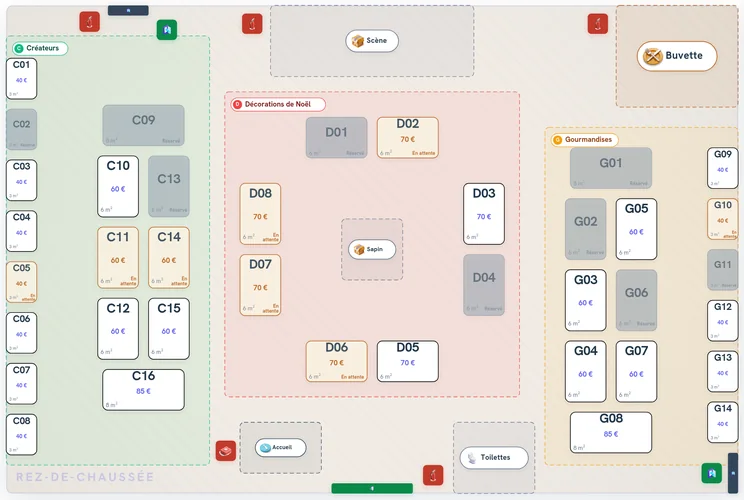
You draw your hall to scale, floor by floor, and place your booths with their numbers and prices. Your exhibitors pick theirs on that floor plan.
Event floor plan software in detailOption catalogNew
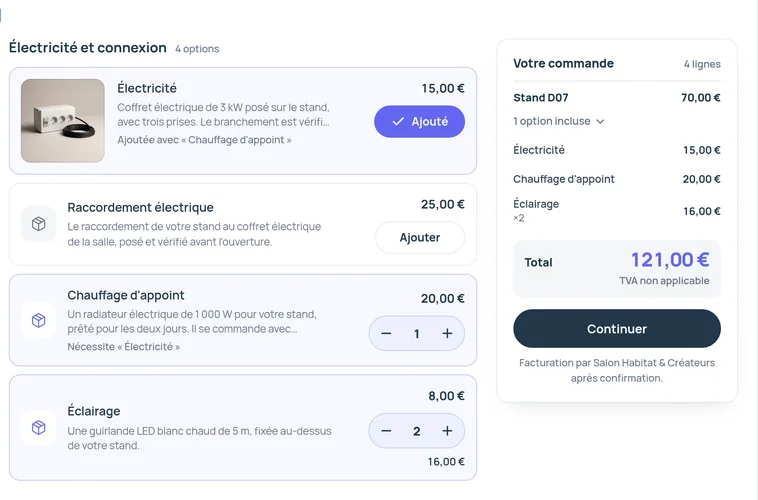
You describe electricity, furniture or Wi-Fi once. Each event takes your catalog at its own prices, and your exhibitors add these options to their booth, one by one or as packs.
The option catalog in detailExhibitor site
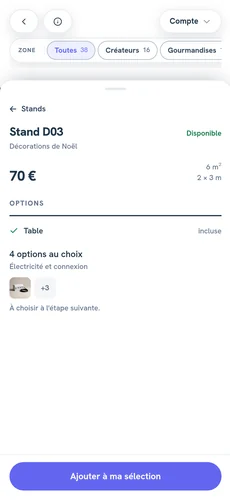
Your booking site is online at your-name.keyqo.io within two minutes of payment. Your exhibitors book there on a computer or a phone, and the site is multilingual.
The exhibitor site in detailEvents and editions
For the next edition, you duplicate the event. The copy keeps the hall, the booths, the prices, the options, the terms and the documents to provide, and your exhibitors keep their accounts.
Duplicate an event for the next edition
Take exhibitor bookings
Online booth booking
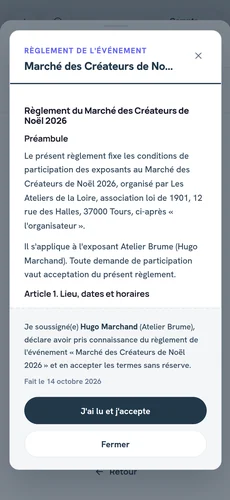
Your exhibitors pick their booth on the floor plan, add their options, upload their documents and accept your terms. You confirm or reject each request, up to 50 at once.
Online booth booking in detailExhibitor management
OpenBy approval
Everyone registered on your site, with their bookings, their documents and what they have paid you, in one place. You approve each new exhibitor before they book, or you leave registration open.
Exhibitor management software in detailSupporting documents
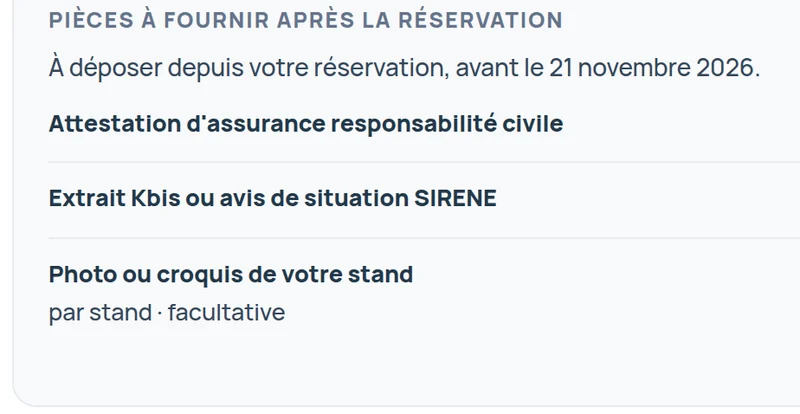
You ask each exhibitor for their documents, such as their insurance certificate or company registration extract, and you can require one before they book. You approve or reject each upload, with a reason sent to the exhibitor.
Collect exhibitor insurance certificates and documentsWaiting listPro, Pro and Organizer plans
24 · 48 · 72 hours
When a booth is already taken, an exhibitor joins its waiting list. If the booking is canceled, you offer the booth to the exhibitor of your choice, for 24, 48 or 72 hours.
The exhibitor waiting list in detailMessagingPro, Pro and Organizer plans
“Can we set up our booth on March 11 from 8 a.m.?”
Your exhibitors write to you from your exhibitor site, and you reply from the admin area, attachments included. Each conversation can be attached to its booking.
Messaging with your exhibitors in detail
Track and welcome
Booking form and terms
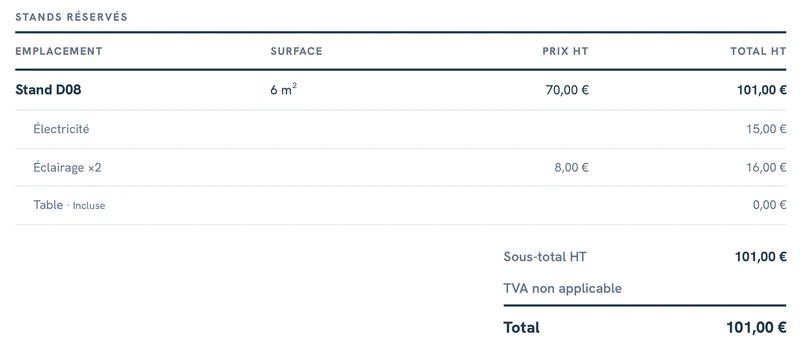
As soon as they send their request, the exhibitor receives their booking form by email, with their booths, their options, VAT, the total and your payment instructions. Your event terms, if you have any, are attached, accepted and dated.
Exhibitor booking forms in detailPayment tracking
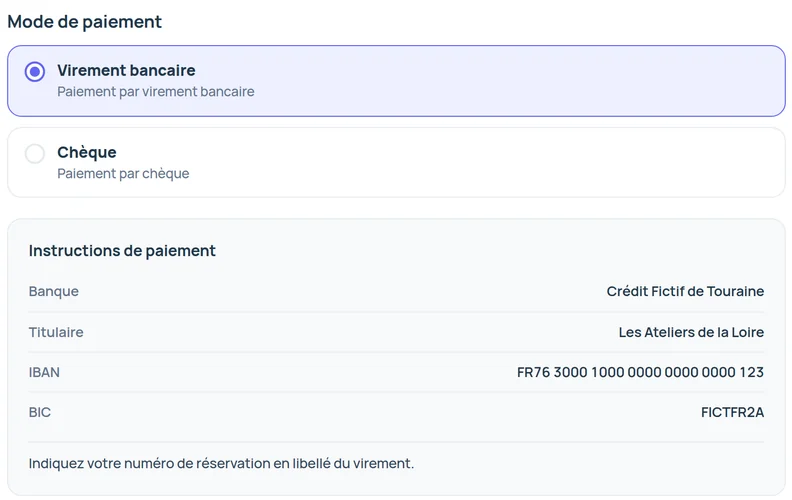
Your exhibitors pay you by bank transfer, check, cash, card on site or with your own payment link. You record each deposit and each balance, and Keyqo works out what is still due.
Exhibitor payment tracking in detailDashboard
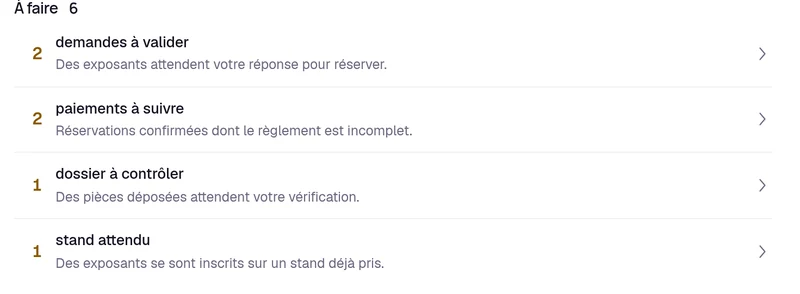
When you open the admin area, you first see what awaits your decision, then this month’s collected payments and each event’s occupancy.
Your event dashboard in detailPreparation list
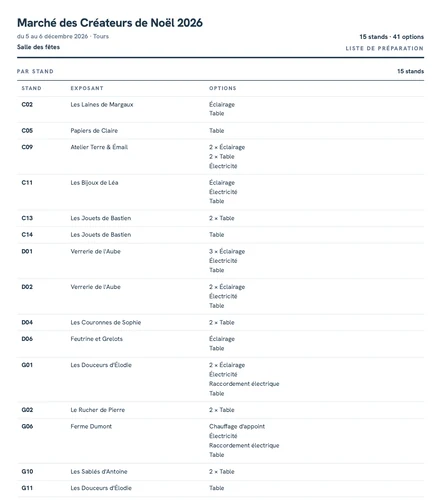
The options ordered form a preparation list as a PDF, booth by booth, with no prices or contact details, for your setup crew and your suppliers. You also print three floor plans, for sales, exhibitors and setup.
The preparation list and printable floor plans in detailExhibitor check-inPro, Pro and Organizer plans
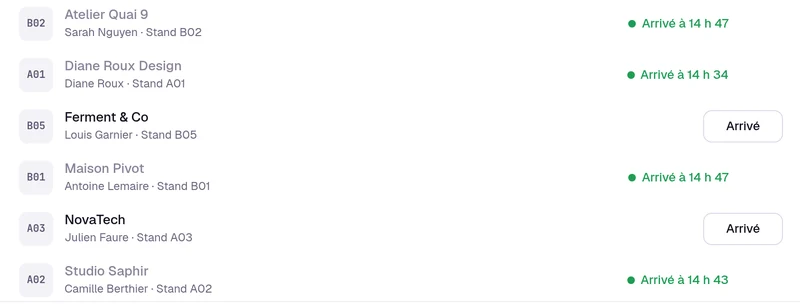
Each exhibitor who has paid in full receives a badge with a QR code by email. On event day, you scan it with a phone or a tablet, with no app to install, or you click “Arrived”.
Exhibitor check-in in detail
Three promises, no fine print
- 0%
- You keep the full price of your booths and your options.
- 24/7
- Your exhibitors book whenever they want, from a computer or a phone.
- 2 min
- Your space is ready within two minutes of payment.
What each plan includes
Everything not marked Pro is in all three plans. Pro and Organizer add the features marked Pro, catalog variants and registering an exhibitor yourself.
| Plan | Essential | Pro | Organizer |
|---|---|---|---|
| Events visible at the same time | 1 | 5 | No limit |
| Booths per event | 50 | 200 | No limit |
| Admin accounts | 1 | 3 | No limit |
| Price a month, billed annually | €15 excl. VAT | €33 excl. VAT | €89 excl. VAT |
| Price a month, no commitment | €18 excl. VAT | €39 excl. VAT | €107 excl. VAT |
Essential
- Events visible at the same time
- 1
- Booths per event
- 50
- Admin accounts
- 1
- Price a month, billed annually
- €15 excl. VAT
- Price a month, no commitment
- €18 excl. VAT
Pro
- Events visible at the same time
- 5
- Booths per event
- 200
- Admin accounts
- 3
- Price a month, billed annually
- €33 excl. VAT
- Price a month, no commitment
- €39 excl. VAT
Organizer
- Events visible at the same time
- No limit
- Booths per event
- No limit
- Admin accounts
- No limit
- Price a month, billed annually
- €89 excl. VAT
- Price a month, no commitment
- €107 excl. VAT
- Pro adds priority support. Organizer adds dedicated support and onboarding help.
Questions about the features
Which events is Keyqo built for?
Events that host exhibitors on booths, indoors or on a town square, from professional events to Christmas markets, from a thirty-booth market to an event with several hundred.
Does Keyqo scan badges at the entrance?
Yes, your exhibitors' badges, on Pro and Organizer. Each exhibitor who has paid in full receives their badge by email, and on event day you run check-in with a phone or a tablet.
Who can see my exhibitors' data?
You and your team. Your exhibitors' accounts exist only on your site. Your data is backed up every day, and sensitive documents are protected.
Your space is ready within two minutes of payment
If you have a question before you subscribe, write to us.