

In short: Keyqo is SaaS software that replaces the spreadsheet to run a trade show. It provides an interactive floor plan, online booth booking by exhibitors and centralized record tracking, from 15 euros per month, with no commitment and no commission. It does not handle visitor ticketing or the program.
Keyqo, focused on exhibitors and the floor plan
Keyqo is SaaS software for managing trade shows, fairs and exhibitions, built for organizers: event setup, interactive floor plan, online booth booking by exhibitors on a dedicated site, and centralized tracking of reservations, records and documents. The organizer subscription starts at 15 euros per month, with no commitment and no commission on your booth sales. Keyqo focuses on this core of the organizer’s job: it does not handle visitor ticketing or program management, and exhibitor payment collection stays handled by you, off the platform, via a purchase order.
Three reasons to leave the spreadsheet
A plan that stays up to date
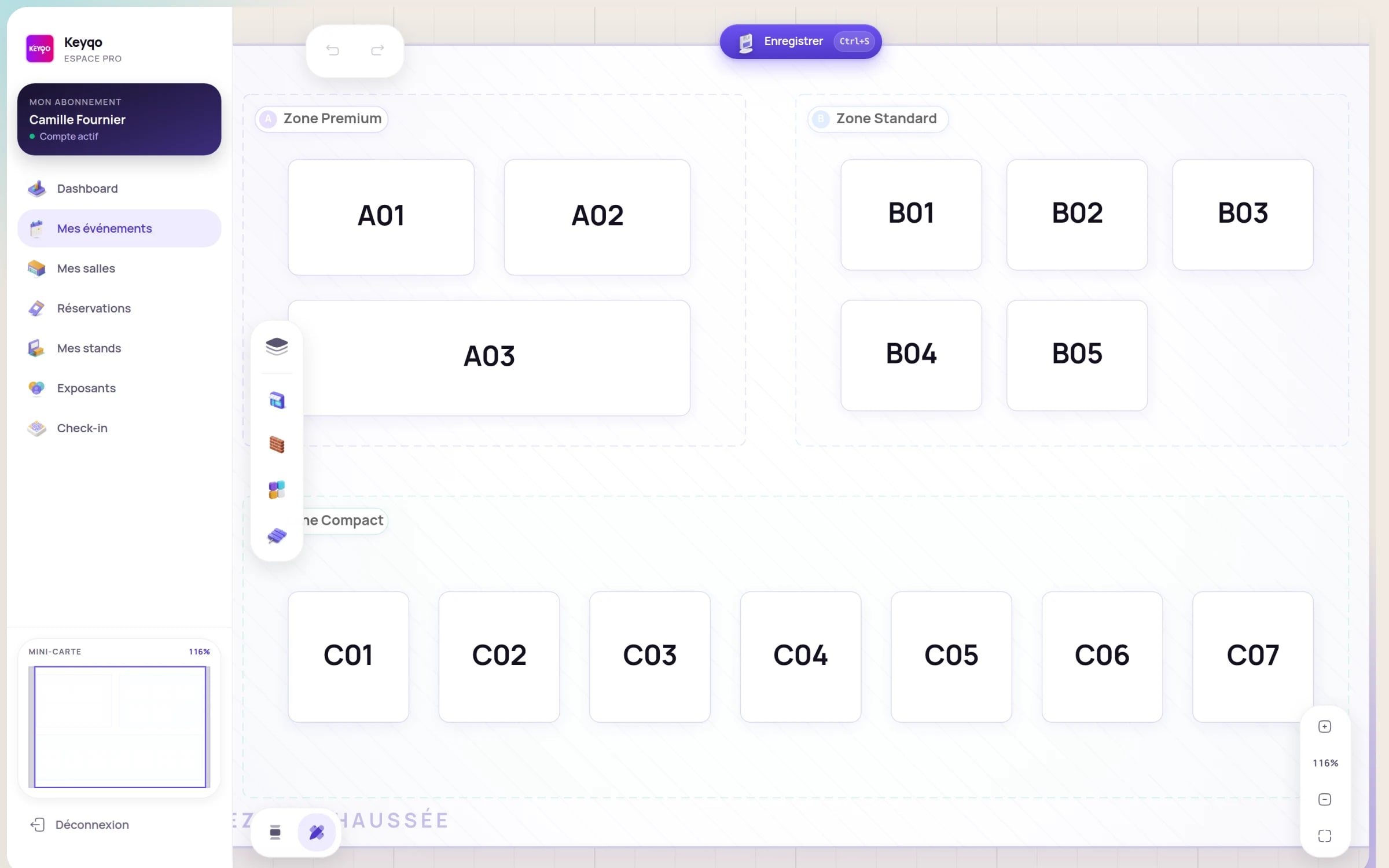
The interactive floor plan editor updates on its own, where an Excel or PDF file is redone by hand on every change.
Exhibitors book on their own
On a dedicated site, each exhibitor picks and books their booth, gets their QR code and follows their application, without email back and forth.
Zero double booking
A booked booth becomes unavailable for everyone in real time: the same booth is never sold twice.
Keyqo, the Excel alternative to organize a trade show
Many organizers start their trade show on a spreadsheet, then look for an Excel alternative as soon as exhibitor management takes over. Keyqo is that alternative: the floor plan, booth booking and exhibitor tracking in a single tool, built for trade show organizers, from a small association event to a regional show.

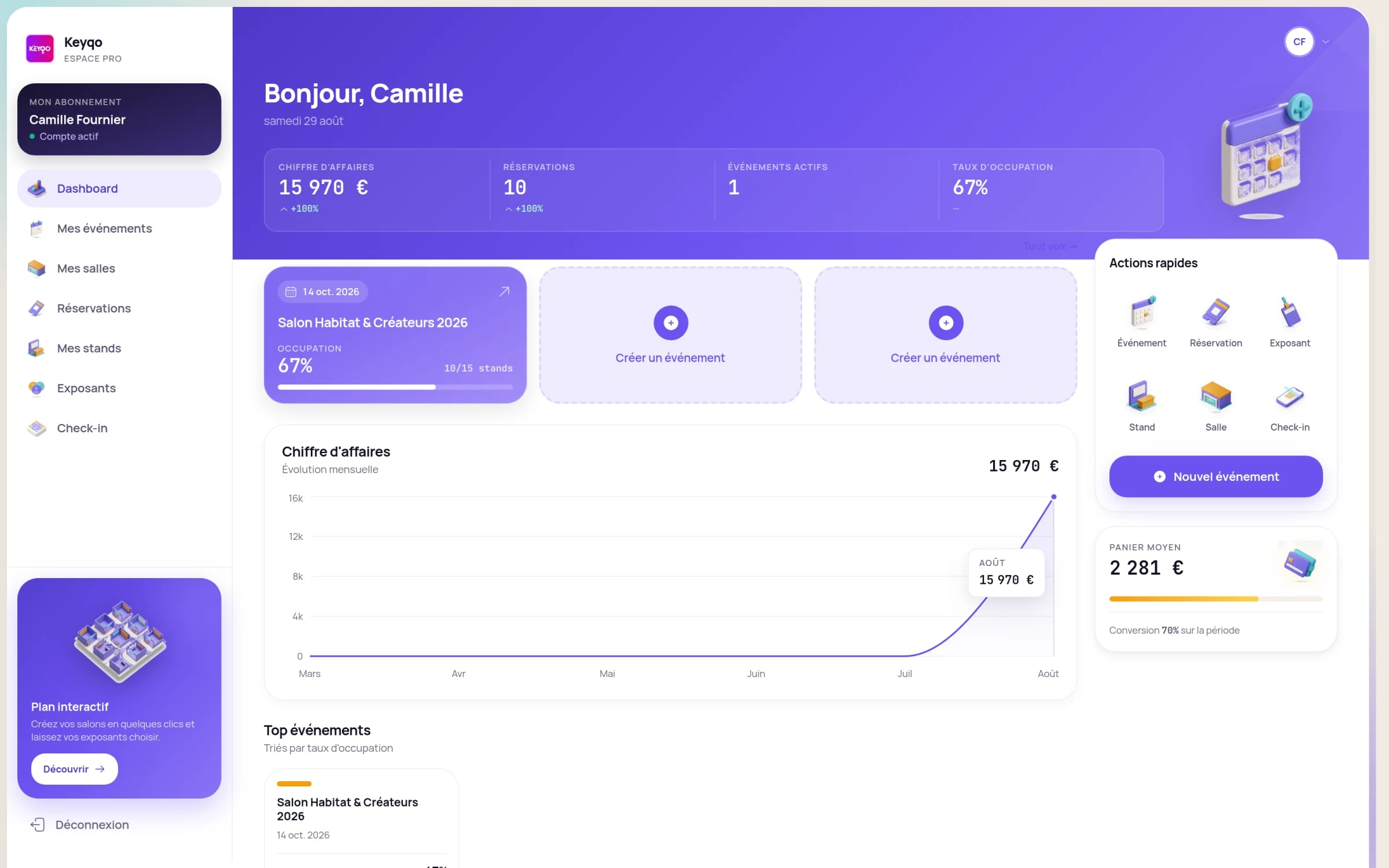
- An interactive plan linked to booth status
- Online booking on a dedicated exhibitor site
- Records, documents and tracking in one place
Excel and Keyqo, side by side
The table lists the concrete tasks of a trade show organizer. Some rows favor Excel, others Keyqo: the goal is to place each tool, not to disqualify the spreadsheet.
| Criterion | Excel / spreadsheet | KeyqoRecommended |
|---|---|---|
| Floor plan | Separate file (PDF, image), redone by hand on every change | Interactive drag and drop floor plan editor, updated automatically |
| Booth booking | By email or phone, entered manually by the organizer | Online on a dedicated site, the exhibitor picks their booth |
| Risk of double booking | Real as soon as several people sell in parallel | Ruled out: a booked booth becomes unavailable in real time |
| Real-time occupancy view | No, depends on the last file update | Yes, availability and fill rate by zone, live |
| Working as a team | File copies, manual merges, risk of overwriting | Centralized space, shared data always up to date |
| Booth pricing | Prices re-entered by hand, error-prone | Prices set once per zone, applied automatically |
| Exhibitor records and documents | Scattered across spreadsheet, emails and folders | Records, documents and payment status centralized |
| Analytics and overview | Pivot tables to build yourself | Built-in analytics (reservations, fill rate by zone) |
| Budget and pricing | Everything entered and recalculated by hand | Prices per zone, amounts and tracking computed automatically |
| Setup | Immediate, but everything is left to build yourself | Plan drawn once, guided onboarding |
| Cost | Free or nearly, often already installed | Subscription from 15 euros/month, no commitment, 0% commission |
| Exhibitor payment collection | Manual tracking | The organizer collects via a purchase order, off the platform |
Across twelve criteria, Keyqo comes out ahead on ten. Excel only keeps the entry cost.
Audits of professional spreadsheets find errors in at least 86% of the files examined, according to Raymond Panko’s review (University of Hawaii, 2008). The risk is not specific to trade shows, but it illustrates why manual re-entry eventually produces errors. Panko, Spreadsheet Errors.
What a spreadsheet really costs
Running a trade show on Excel costs nothing to buy, but the real cost of a spreadsheet is measured in time and errors.
- Re-entry time: every exhibitor, every booth change and every price is retyped by hand.
- Multiple versions to reconcile as soon as several people work on the same file.
- The cost of a double booking discovered the day before opening.
- Hours of email follow-ups to collect exhibitors’ information and documents.
The questions organizers ask
Can you draw a floor plan in Excel?
You can represent a plan in Excel, but it stays a frozen image, disconnected from the data. Every booth sold or moved means redoing the file and resending it, and several versions end up circulating. An interactive floor plan links each spot to its status (free or booked), its price and its exhibitor record, and updates on its own.
How do you prevent two exhibitors from booking the same booth?
To rule out double booking, you use a single online plan where a booked booth immediately becomes unavailable for everyone. With a spreadsheet shared across several copies, the risk stays real: two people can sell booth A12 the same afternoon, and the mistake surfaces the day before opening.
How do you track exhibitor payments and documents?
A software centralizes each exhibitor’s records, documents and payment status in one place. In Excel, the information is often scattered across the file, the mailbox and a folder of PDFs, and chasing latecomers becomes detective work. Collection itself stays handled by the organizer off the platform.
A simple list is enough if
To be fair: at the very start, a simple list can be enough while you validate your idea. Two cases where a spreadsheet still does the job, before management becomes real work:
Excel is enough if
- You are testing an event idea that is not even certain to happen: a list of names is enough while you validate it.
- A few speakers you already all know, with no floor plan or booking to manage.
Keyqo makes sense if
- Several people sell booths in parallel
- The plan changes often, or you run several editions
- You want exhibitors to book online, without back and forth
Moving from Excel to Keyqo, step by step
Changing tools does not mean re-entering everything. You draw the plan once, then your exhibitors enter their own information when they book their booth.
Setup takes five steps:
- 1Create and configure your event.
- 2Draw the floor plan once, by drag and drop.
- 3Set prices per zone.
- 4Open online booking on your exhibitor site.
- 5Your exhibitors book their booth and enter their own information.
What’s included, plainly
- Pricing
- From 15 euros per month, with no commitment and 0% commission.
- Data hosting
- In France, on OVH infrastructure.
- Privacy
- GDPR-compliant data processing.
- Commitment
- None. Organizer subscription you can cancel anytime.
- Commission on your sales
- 0%. You keep 100% of your booth revenue.
- Onboarding
- Guided. Draw the floor plan once, then your exhibitors book their booth on their own.

Excel or Keyqo: how to decide
The real criterion is not the number of exhibitors, it is the time you spend re-entering data and the risk of allocating the same booth twice. A simple list gets you started. But as soon as you want a plan that stays up to date, exhibitors who book on their own and centralized tracking, Keyqo saves you a lot of time and makes your data reliable, on a show of ten booths as much as three hundred.
Go further with exhibitor management, Keyqo’s features, pricing and the FAQ.
To dig deeper, see our guide to choosing trade show management software.
Frequently asked questions
Can you manage a trade show with Excel?
Yes, it is possible for keeping a first list of exhibitors. But Excel quickly shows its limits: the floor plan is not linked to exhibitors, booking is done by hand, files get duplicated and the risk of double booking appears. The moment to switch is when your exhibitors need to book on their own and the plan keeps changing.
At how many exhibitors should you move from Excel to a software?
There is no magic threshold, and it is not only about the number. As soon as your exhibitors book on their own and the plan keeps changing, even a ten-booth show benefits. The concrete signals: several people selling in parallel, last-minute changes, files in several versions.
Which software to manage a trade show’s exhibitors?
The criteria that really matter: an interactive floor plan, online booth booking by the exhibitor, and centralized record and document management. Keyqo brings these three building blocks together in a single exhibitor management software, built for organizers of trade shows, fairs and conventions. It is a direct alternative to the spreadsheet, simpler to get started with than the big congress suites.
Do you have to re-enter everything when leaving Excel?
No, you do not start from scratch. On Keyqo, setup mainly means configuring the event and drawing the floor plan once. After that, it is your exhibitors who enter their own information when they book their booth online, which spares you the re-entry the spreadsheet used to require.
Is there a free software to run a trade show?
Freemium offers exist, often limited in the number of exhibitors or features, with a restricted plan and booking. Most complete solutions are subscription-based. The right calculation is the real cost of the tool against the time saved. Keyqo is a subscription software, not a free offer.
Does Keyqo handle visitor ticketing?
No. Keyqo focuses on the organizer and their exhibitors: event setup, interactive floor plan, online booth booking, exhibitor tracking. Visitor ticketing and program or conference management are outside its scope.
Does Keyqo fully replace Excel?
For managing your show, yes: the floor plan, booths, pricing, reservations and exhibitor tracking all live in Keyqo, in one place and up to date in real time. No more juggling files in several versions. Nothing stops you from keeping a spreadsheet for a personal note, but running the show itself lives in Keyqo.
How do you make a trade show floor plan with the booths?
A plan drawn in Excel, PowerPoint or a design tool stays static and is updated by hand. An interactive plan links each booth to a status, free or booked, and to a price. Keyqo offers an interactive drag and drop floor plan editor where the exhibitor books their spot directly online.
Is there an Excel template to manage a trade show and its exhibitors?
Yes, free Excel templates for exhibitor tracking or planning are easy to find. They get you through a first list, but stay static files: the floor plan is not linked to the data, every change is retyped by hand and several versions end up circulating. Keyqo takes what a template does and adds the interactive plan, online booth booking and centralized tracking.
How much does trade show management software cost?
Prices vary with the size of the show. Keyqo works on a subscription from 15 euros per month, with no commitment and no commission on bookings. The math adds up fast: the first double booking avoided often covers the subscription.
Do you need software for a small show or a first edition?
As soon as there are booths to place and to book, the tool pays off fast, even for a small show. For a very first idea not yet validated, a simple list can be enough while you test.
How do you set booth prices?
Prices are usually set per square meter and per zone, for example premium and standard. On Keyqo, the organizer sets prices per zone once, and they apply automatically to every booking.
How do you organize a trade show?
The main steps: define the concept and audience, book the venue, draw the floor plan, set booth prices, open booking to exhibitors, then drive the fill rate. Exhibitor management software like Keyqo handles the plan, online booking and tracking.