
All
Trade Show Booth Ideas: The Complete Guide for 2026
Trade show booth ideas that drive traffic and qualified leads: real budgets, formats, technologies, mistakes to avoid and real-world examples.
12 min

How to create your trade show floor plan: safety constraints, a 6-step method, aisle widths, booth sizes and moving to an interactive bookable plan.
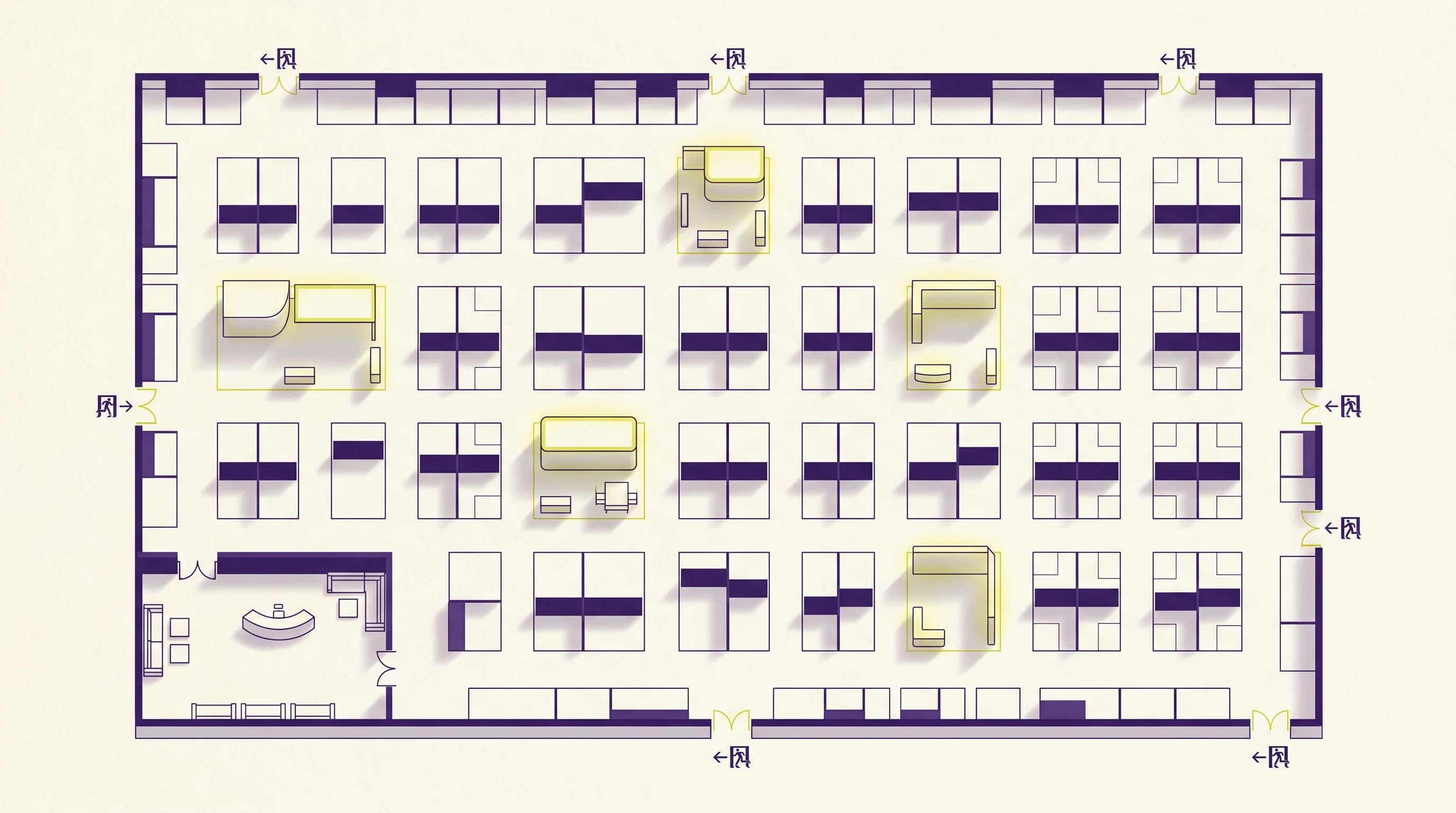
A trade show floor plan is not an administrative formality. It is the document that decides how many booths you sell, how visitors move through the hall, and whether the safety commission approves your event. A well-designed plan fills the back aisles. A sloppy one leaves dead zones that exhibitors will hold against you the following year.
This guide explains how to build a trade show floor plan from scratch: the safety constraints to respect, the method to divide the space, the aisle widths to plan for, and the tools to move from a paper sketch to a plan your exhibitors can actually use.
The floor plan, also called the layout or implantation plan, is the scale representation of the exhibition space: the location of each booth, circulation aisles, reception areas, catering zones, emergency exits and technical rooms. It is at once a sales tool (what you sell to exhibitors), a logistics tool (what the setup crews follow) and a safety document (what the commission reviews).
Three audiences read this plan, and each expects something different from it:
A plan that serves only one of these three audiences is a failed plan. The challenge is to fit all three on a single sheet.
In France, a trade show takes place in a public-access venue (ERP) classified as type T (exhibition halls). The safety regulation governs the layout precisely, and the safety commission can reject a non-compliant plan. It is far better to factor these constraints in from the first sketch than to discover them three days before opening.
A few structural principles to know:
This article does not replace the safety regulation or the safety officer's review, which remain the reference. But keeping these orders of magnitude in mind avoids drawing a plan that will have to be entirely redone.
Get the venue's technical plan from the operator: exact surface, column positions, ceiling height, water points, electrical supplies, loading docks and emergency exits. These elements are fixed: your plan has to work around them, not the other way around. A column in the wrong place or a distant power supply can make a spot unsellable.
Before placing the first booth, mark the imposed elements: emergency exits and their clearances, safety aisles, the reception and entry-control area, catering, restrooms. This is the "negative" of your plan. What remains is your actually sellable surface.
Most trade shows work with standard modules: 9 m² (3×3 m) for small exhibitors, 12 m² (4×3 m), 18 m² (6×3 m), and 36 m² islands (6×6 m) accessible from several sides for premium exhibitors. Working on a regular grid simplifies sales, setup and invoicing. A plan with fifteen different booth sizes is a nightmare to sell.
This is the most common mistake: fill the hall with booths, then squeeze aisles into what is left. Do the opposite. Good circulation guides the visitor toward the back of the hall and routes the flow past as many booths as possible. Plan wide main aisles (visitors cross, stop and talk there) and avoid dead ends that create unvisited zones.
For orders of magnitude, accessible structuring aisles are at least 1.20 m wide to allow a wheelchair to pass, and a show's main circulations are in practice much wider to absorb peak-hour flow. The exact width depends on expected attendance and must be validated with the safety officer.
Not all booths are equal. Spots near the entrance, at main-aisle corners and on traffic axes are worth more and sell first. Back-of-hall spots and dead ends are the hardest to sell. A good practice is to place a "magnet" (an activity, a conference, a flagship exhibitor, catering) at the back to pull the flow and add value to the remote zones.
Once the layout is locked, number each booth logically (by aisle, by zone), add a clear legend, and prepare the version your exhibitors and visitors will see. The organizer's internal plan and the public plan do not have the same level of detail: the public needs to find their way, not see your electrical supplies.
Many organizers start their plan on paper or in a spreadsheet, with numbered rectangles. It works to visualize, but it quickly shows its limits: every change (an exhibitor cancelling, a booth split in two, an aisle widened) forces a full redraw, and the version exhibitors receive is frozen.
A static plan creates three concrete problems:
The interactive plan answers these limits. The organizer draws the plan once, marks booths, zones and aisles, and each spot becomes clickable. Exhibitors view the plan online, see what is available and book directly. The status updates automatically, which eliminates double bookings and the parallel spreadsheet tracking.
On the organization side, running a show means chaining the plan, exhibitor registration, booking tracking and communication. French trade show management software like Keyqo, focused on exhibitor management and the interactive floor plan, brings these steps into a single tool, from drawing the plan to tracking bookings online.
Start by getting the hall's technical plan (dimensions, columns, exits, technical supplies) from the operator. Lay out the imposed constraints first (safety aisles, reception, exits), define a grid of standard booth sizes, then draw circulation before filling the space. Finish with numbering and a readable version for exhibitors and visitors. An interactive floor plan editor lets you evolve the plan without redrawing everything on each change.
Accessible structuring aisles are at least 1.20 m wide to allow a wheelchair to pass. In practice, a trade show's main aisles are noticeably wider to absorb peak-hour attendance. The exact width depends on the expected number of visitors and must be validated with the safety officer, because these circulation aisles are "non aedificandi" and serve evacuation.
It depends on the hall surface, booth size and aisle width. A rule of thumb: in a standard hall, roughly half the surface goes to circulation, reception, exits and technical zones. On 1,000 m² of hall, you do not sell 1,000 m² of booths. For a precise calculation based on your dimensions and booth sizes, an area calculator or a floor plan editor gives a reliable estimate.
Yes. A trade show takes place in a type T public-access venue, and the layout plan is part of the safety file co-signed by the organizer and the safety officer. The safety commission can review and reject a non-compliant plan (clearances, aisles, exits). Factor these constraints in from the first sketch to avoid redoing everything.
A paper or spreadsheet plan is enough to visualize, but it does not update and offers no interaction. As soon as you manage several dozen booths with evolving bookings, an interactive plan avoids double bookings, lets exhibitors view and pick their spot online, and projects a more professional image of your show.
If you organize a trade show, these companion guides cover the steps adjacent to the layout plan:
Sources: